June 13, 2026
Single-Box Deployments
I like building in the cloud. We can all appreciate the managed services, global network, and "infinite" scale. The mindset behind the various "well‑architected" frameworks (design for failure, automate everything, treat infrastructure as code) is great.
But the easy trap is to think that the only responsible way to build in the cloud is to start from the well-architected framework. I would argue that many workloads would benefit from something simpler.
It's like walking into a Lamborghini dealership because you need a way to get to work, one mile away, once a day, and then congratulating yourself for buying the cheapest Lamborghini on the lot. You did, technically, optimize for cost, but only after being constrained to an absurd part of the solution space. Buy a bike! Or a Corolla.
One of the alternatives is what I call the "single-box deployment." A single-box deployment is one VM or one physical server that hosts the web layer, the API, the database, the scheduled jobs, and perhaps a cache, with:
- - Automated backups
- - Basic monitoring
- - A CI/CD pipeline
The "well-architected" escalation
Developer: "Hey, I'm working on this application and will need some infra. For the POC, I put it on an EC2 instance, attached an Elastic IP, pointed DNS at it. I need to build it out in our higher environments."
IT: "Okay, good start! As we move this workload into production, we need to line this up with our standards a bit more. First, let's put that instance into an Auto Scaling Group and span it across two availability zones. Then put an Application Load Balancer in front so traffic is balanced and we can lose an instance without downtime."
Developer: "Done!"
IT: "Next, the database. Right now you've got Postgres on the same EC2 volume. For production, we want that in a managed database service. We use RDS for lower environments and Aurora for production. It will save you a ton of headache in database maintenance. We'll turn on multi‑AZ in production, so that our data-layer availability matches our compute-layer availability in that Auto Scaling Group."
Developer: "Here's the updated diagram."
IT: "Let's talk about that database a little more. Your poor primary has no backup. Do you need any read replicas for scalability? Let us know what you expect your workloads to be in the future, and your availability requirements. Also, for production workloads, we need to add a cross‑region replica to meet our department's disaster recovery policy."
Developer: "Roger. I think we'll be ok on scalability, at least for now. We can skip the read replicas for now and either add them later or add a queue for database writes down the road."
IT: "Good call. Almost there — networking is next. Move the application instances and the database into private subnets. Only the load balancer should be in a public subnet. Add an Internet Gateway for the VPC, and a NAT Gateway so your private resources can reach out to the internet for updates and external APIs. We'll configure our WAF to attach to your load balancer automatically."
Developer: "OK, here is the architecture."
IT: "Close, but you can't currently access the private resources for deployments or developer access. Set up either a bastion host in a controlled subnet, a route from our VPN into the VPC, or both. Put a VM with a self-hosted runner inside the private network, so that you can run deployments and migrations on your EC2 instances and database. Use IAM roles for those deployments so access is tightly controlled and auditable."
Developer: "Done."
IT: "Good. Next step is to give us this architecture as infrastructure‑as‑code. We are proud to have no click‑ops happening around here! That way we can avoid environment drift and track changes through version control. Make sure to include observability in your infra. At a minimum, send metrics and logs to CloudWatch. Document the alerts you will configure. You will need this in our yearly tabletop."
Developer: "Here you go!"
IT: "Last thing: we took a look at your expected workloads, and we see a lot of static content being served. Since the user base for this could be global, we suggest you front the app with a CDN. Start with just the static content. If latency becomes a problem down the road, we can look at edge functions for dynamic paths."
Developer: "Okay, thanks for walking me through this. This feels like a great architecture."
When single-box is right
I've been in that conversation countless times. Every step is locally rational (improving availability, reducing RTO/RPO, locking down the network, adding observability, pushing static content to a CDN), but globally irrational... at least for some workloads.
At what point is the scale or availability of the workload large enough to warrant the cost and complexity incurred by that architecture? It takes a lot. I'll show you what I mean.
Scale
At runtime, servers act more like pipes than buckets. You don't "fill them up with requests"; you push work through them. Requests arrive, wait in a built-in queue, get processed, and exit. The limiting factor in scalability is the number of concurrent requests the server can handle at any given time.
Little's law says that Concurrency = RPS (requests per second) x Latency.
Imagine a typical CRUD‑style web request:
- - 10 ms sitting in the web server's queue
- - 30 ms for an internal Postgres query
- - 60 ms for an internal API call
That's a 100 ms end‑to‑end request. At 100 RPS, the process would have 100 (RPS) x 0.1 (s) = 10 concurrent requests at a moment in time. In reality, however, latency increases as server load increases. That's why we size compute based on the tail, not the average.
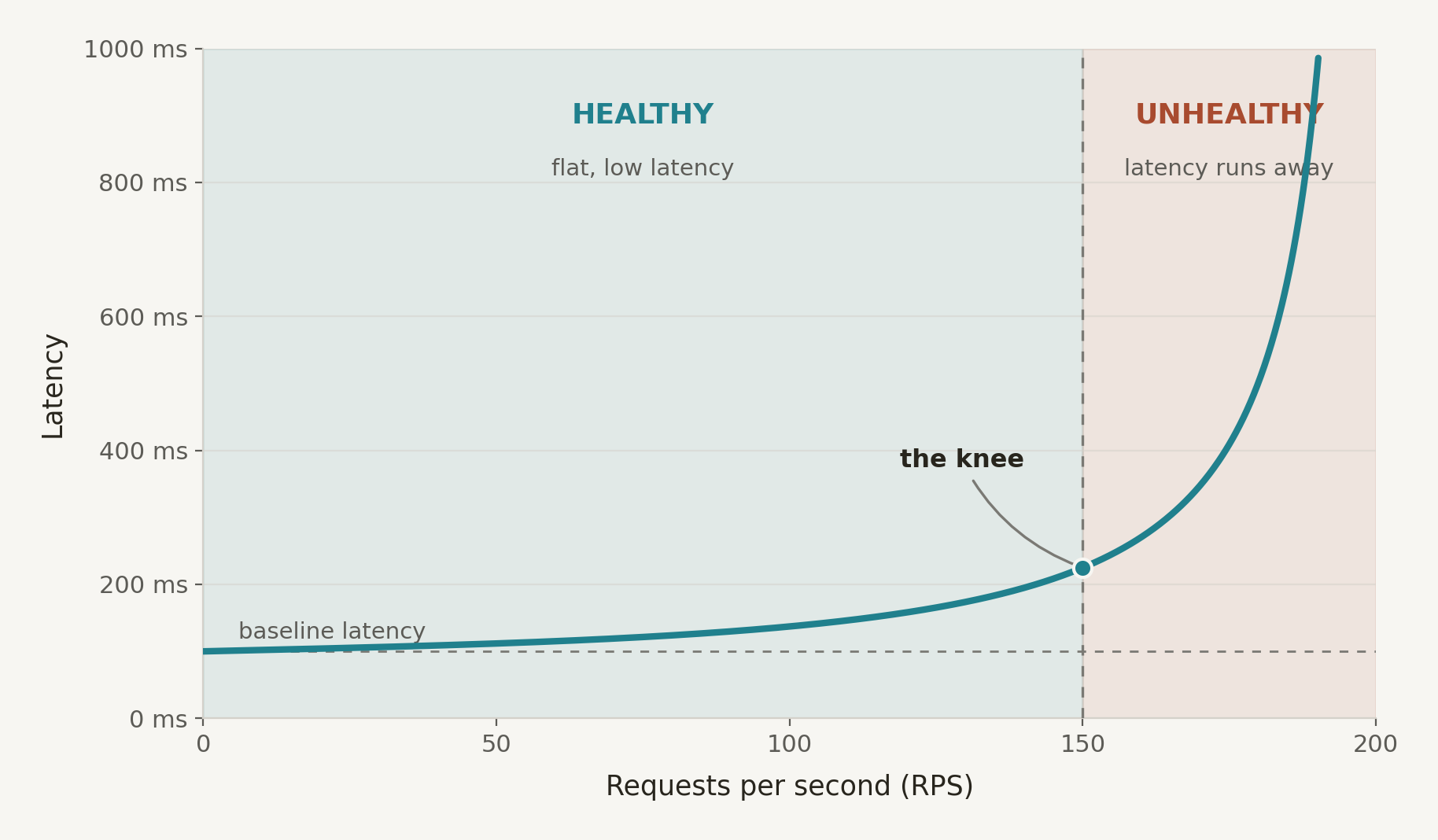
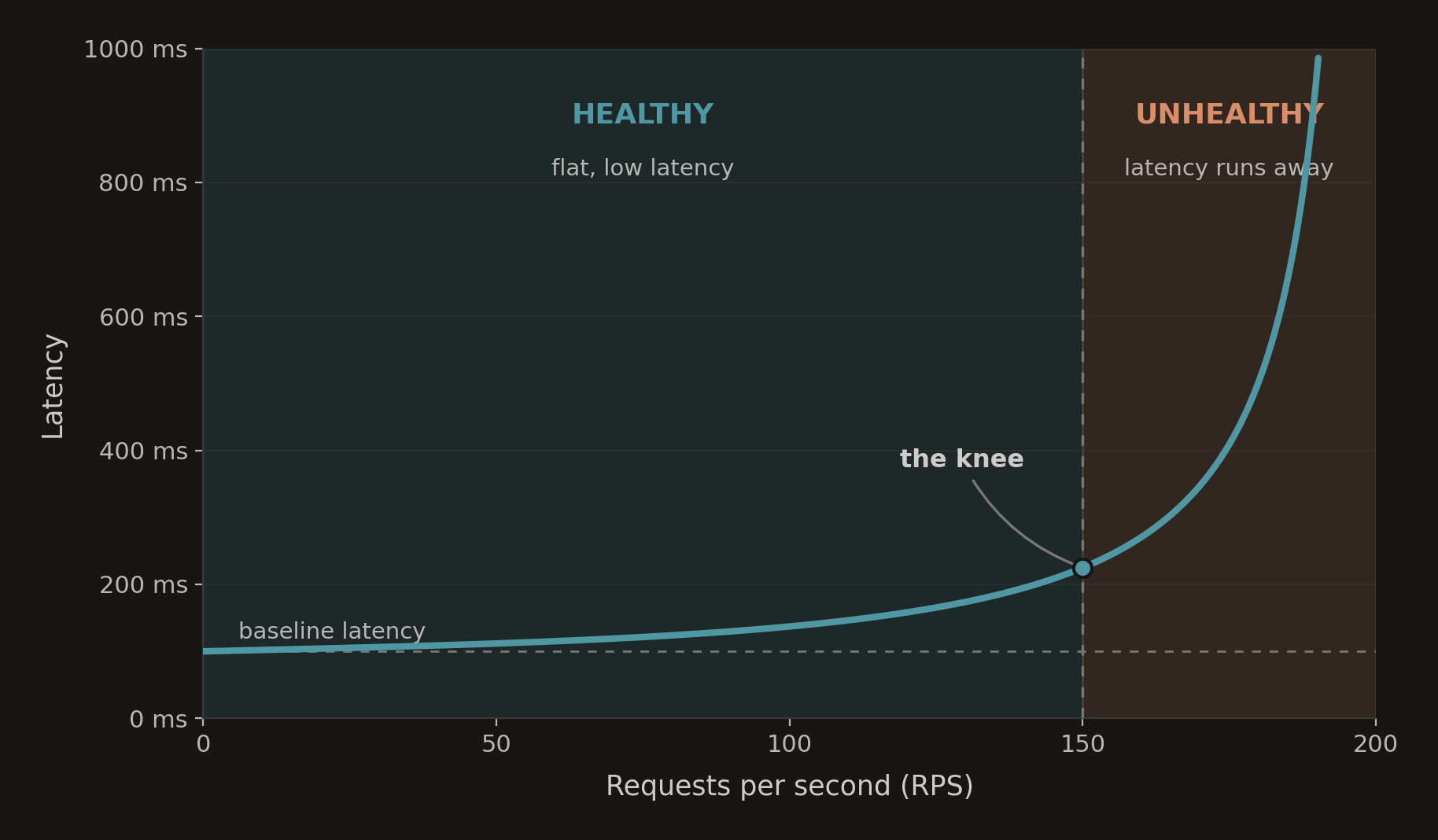
Production capacity planning uses something like: Thread Pool Size = RPS x p99 Latency x Safety Factor. The safety factor is often 1.5-2x, to handle bursty traffic. For example, you might plan for 100 RPS at 300 ms p99 latency like this:
- 100 x 0.3 = 30 concurrent requests
- 30 x 2 (safety factor) = 60 worker slots
And of course you have to think about the nature of the workload. For CPU‑bound workloads, adding more workers than you have cores doesn't usually make the server crash — it just makes everything slower, because all those runnable threads are contending for the same cores and the OS is constantly context‑switching between them. For IO‑bound workloads, each in‑flight request holds some RAM while it waits, so if you push concurrency high enough you don't just get slower, you eventually risk an out‑of‑memory kill, which is a crash from the application's point of view.
In general, a single general‑purpose, memory-optimized, or compute-optimized compute instance with a few vCPUs and several GB of RAM (think t3.medium / t3.large class) can easily sustain hundreds of RPS of these CRUD‑style IO-bound or CPU-bound requests, with sub-second latency.
Availability
The usual objection to a single-box deployment is availability. One machine, one point of failure, game over. But before you reach for multi-AZ/multi-region, don't forget: a single AZ lands somewhere around 99.9% availability on its own. That's roughly nine hours of downtime a year.
The entire multi-AZ stack exists to push past that 99.9% into "four nines" territory. Most internal tools and line-of-business apps would happily trade nine hours a year for half the bill and a less complexity.
The rest of the job is recovering quickly when the box dies (RTO), without losing much data (RPO). That comes down to a short list:
- - Ship your database backups off the box (object storage, on a schedule)
- - Snapshot the whole volume so you can roll the machine back, not just the database
- - Keep a golden image and a rebuild script so recovery is "launch, restore, repoint DNS"
Cost
This is where things get interesting.
To put some numbers together, let's imagine we're dealing with an IO‑bound web workload. At steady state it runs around 100 concurrent requests, but we expect it could grow to 500 concurrent requests over the next 3 years. Data grows at a moderate rate, say 2–5 GB per month, and we're comfortable keeping 1–2 years of online history in the primary database before archiving.
To be safe, let's design for 1000 worker slots: enough headroom for bursts, background jobs, and a bit of over‑provisioning. For an IO‑bound workload, that translates to a VM with something like 4-8 vCPU, 16-32GB RAM, and enough SSD-backed storage for the database and growth (500-1000 GB). If the box were in AWS, it might be a general-purpose EC2 like m6i.xlarge, though it could just as easily be a comparable DigitalOcean droplet or an amortized Mac mini ($5400 over 36 months). Total: $150/month
In a well‑architected solution, we would size the app instances for minimum expected load and let the platform scale out:
- - App tier: 1–N EC2 instances (e.g., t3.medium or t3.large) behind an ALB, in an Auto Scaling Group with min=1, max large enough to handle peak (say 6–8 instances): $30/month (baseline) - $140/month (peak)
- - Database tier: RDS or Aurora with multi‑AZ for production, sized to handle peak concurrent connections and storage growth: $150/month
- - Networking and access: VPC, public/private subnets, NAT Gateway, Internet Gateway, VPN or bastion for access: $40/month
- - Logs and metrics: CloudWatch ingestion and storage for all of the above: $8/month
- - Total: $228/month (baseline)
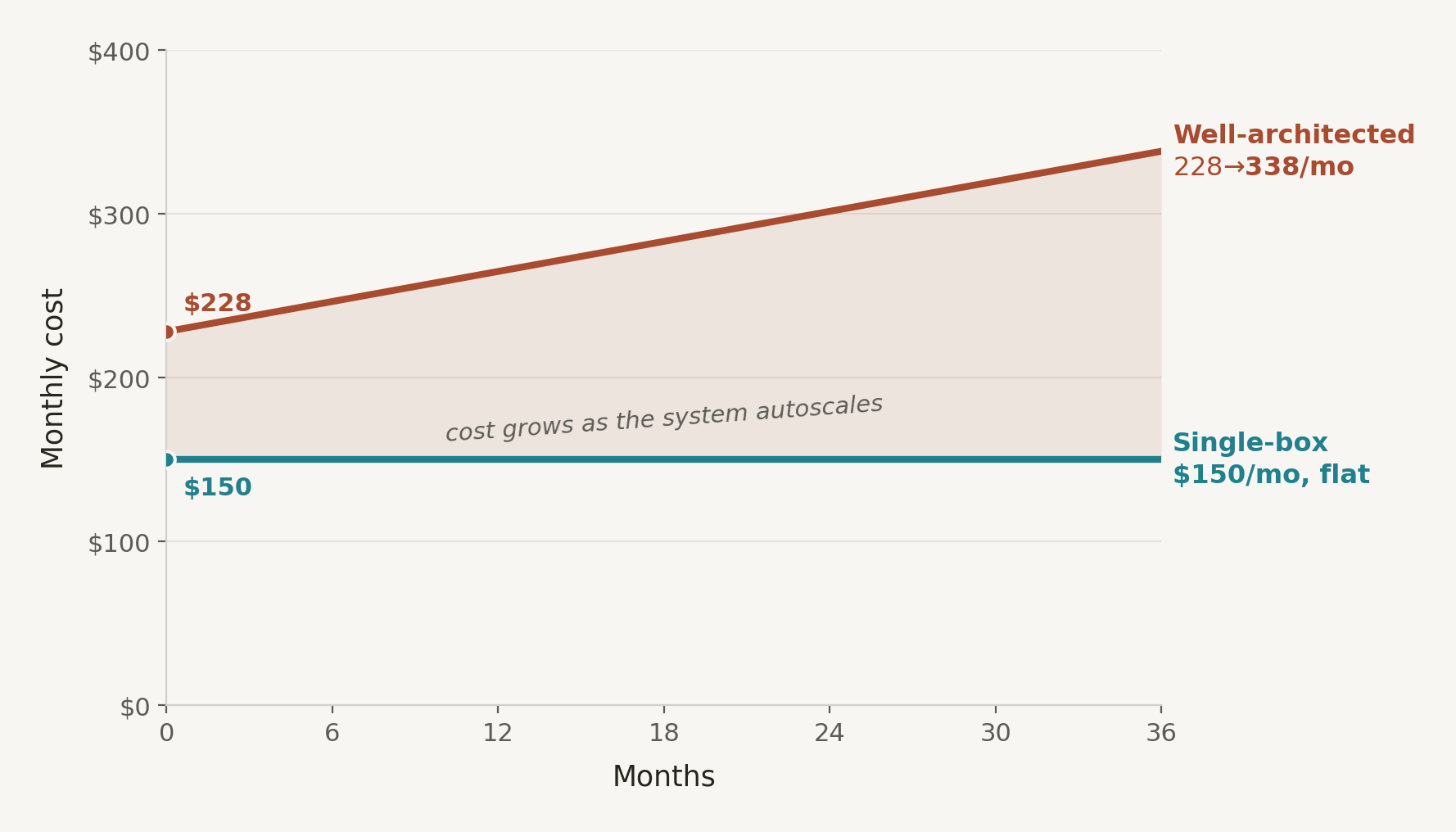
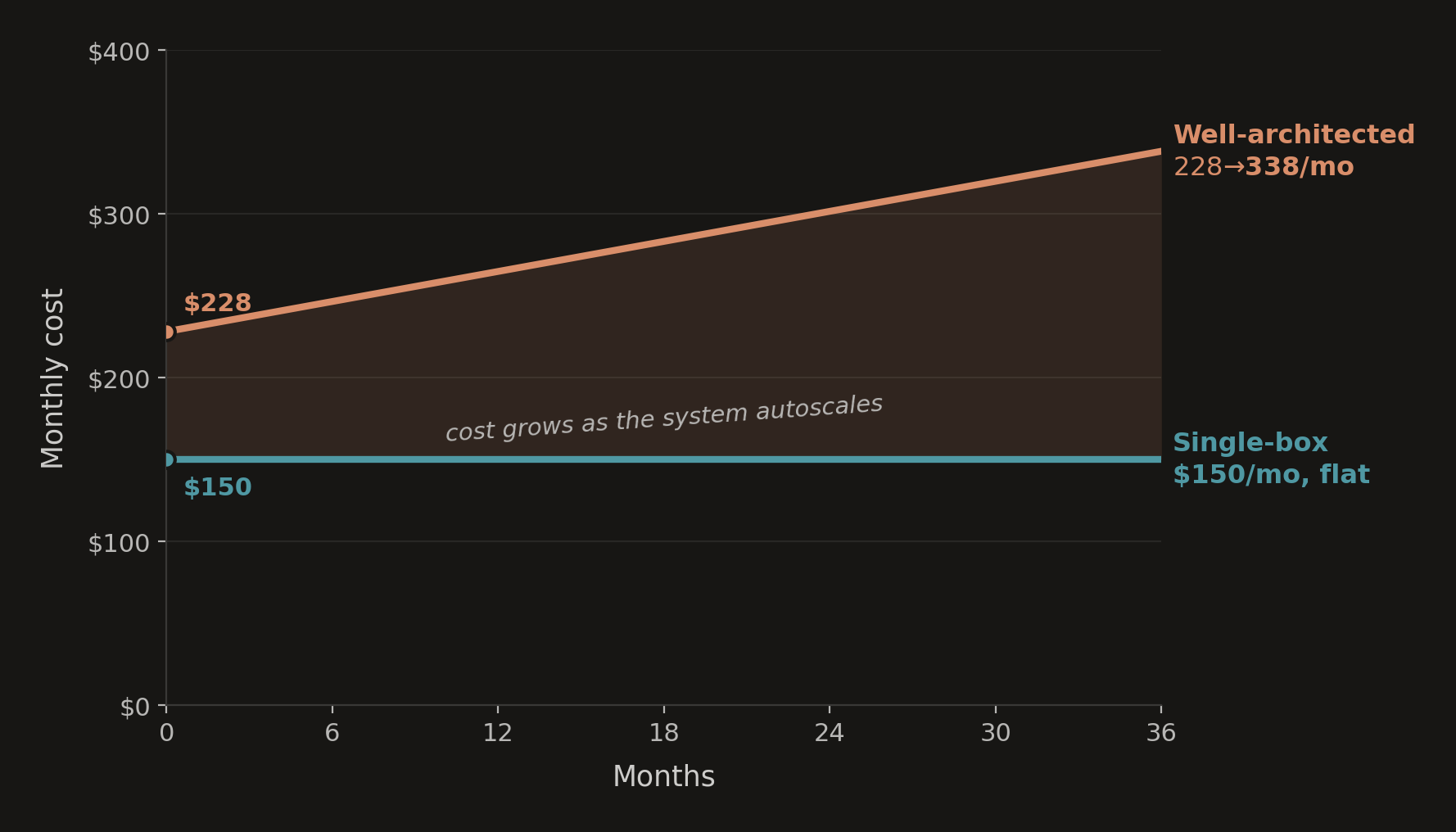
In the single-box deployment, cost is predictable and stays fixed over time as data and usage grow. In the well-architected solution, cost is dynamic across a constellation of resources and grows as the system autoscales.
Complexity
When moving from a well-architected solution to a single-box deployment, you're trading one form of complexity for another. Before, you had a distributed topology and a bunch of services. Now, you have a simple topology, but you have to manage your own server. A key difference is that distributed complexity is emergent. It surfaces in the interactions between resources. Single-box complexity is mostly static — a list of things to install and configure correctly once, then maintain.
I happen to enjoy managing servers, but I know many don't. It helps that the world is generally using containers for applications now. There is plenty of open source tooling for deploying containers to boxes, such as Kamal, which provides zero-downtime deploys, rolling restarts, asset bridging, remote builds, and accessory service management.
When single-box is wrong
No doubt, there are workloads where the well‑architected approach is necessary.
- Regulatory and compliance workloads — If you are handling regulated data (HIPAA, PCI, etc.), and you require strong isolation and detailed audit logging, you're in well‑architected territory. You often need things like separate network tiers, hardened managed databases, and cross‑AZ or cross‑region storage.
- - Very high availability SLAs: When the business needs less than an hour of downtime per year, multi‑region architectures with automated failover and replication are necessary. A single box, no matter how beefy, can't exceed three 9's of availability.
- - Global latency requirements: If you have a large, geographically dispersed user base and hard user‑experience requirements (e.g., sub‑100 ms p95 from multiple continents), you will need CDNs, regional replicas, and sometimes active multi‑region deployments.
- - Traffic profiles that outgrow vertical scaling: Eventually, some workloads outgrow what you can do on a single machine at a reasonable price point... very high sustained RPS, heavy compute, streaming, etc.
Ride a bike
Of course, we shouldn't go too far the other way and cram everything onto VMs just because its cool. The point isn't that single‑box deployments are superior to well‑architected systems, or visa versa. The point is to start empirically with what the workload demands, not with a reference diagram from a cloud certification course.
I'm often surprised by how much load a single VM can handle, once you run Little's law math and look at real latency and throughput numbers. Many of the projects I work on, including this website, easily fall within what one well‑sized box can support. I've certainly benefited from the lower monthly bills and reduced complexity.
In a cloud full of Lamborghinis, sometimes the best thing to do is ride a bike.